Optimizing your game
Is your game slow? This guide will show you how to find and fix performance issues.
Understanding FPS
Section titled “Understanding FPS”A vectarine game will always try to run at a divisor of the display’s refresh rate, usually 60 FPS. This is because rendering more often is wasteful, consumes more battery and heats the CPU for no reason.
Thus, when optimizing performance, we don’t care about the FPS, but about the time it takes to render a frame. As long as this time is below 16.67ms (1000ms / 60), the game will run at 60 FPS. If it takes more than that, the game will drop to 30 FPS, then 15 FPS, etc.
Profiling
Section titled “Profiling”To know what to optimize, you need to know what is taking time.
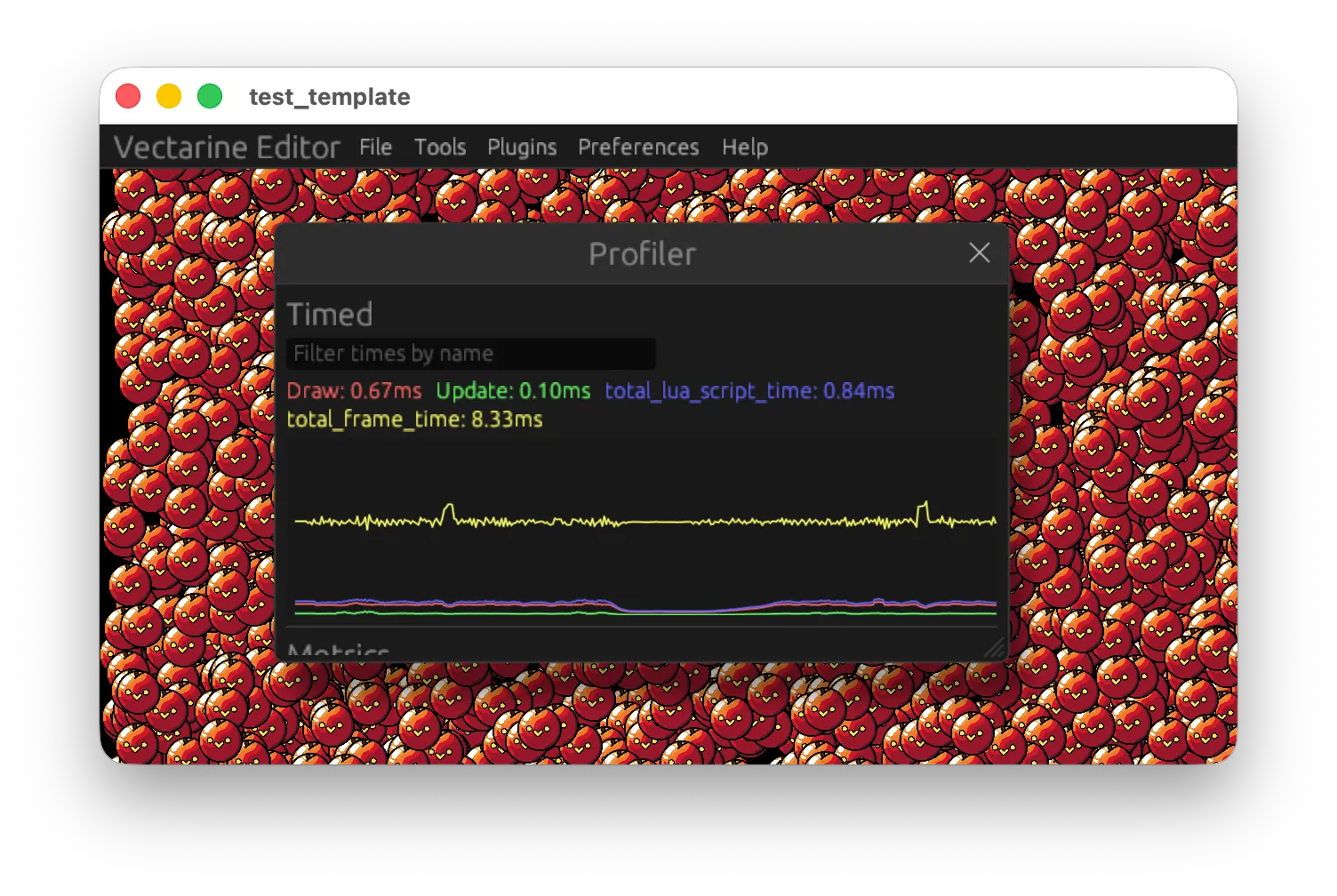
Vectarine has a built in profiler that shows you how long it takes to render a frame as well as other performance information.
-
total_lua_script_timeis how long your Luau code took to run this frame. -
total_frame_timeis how long the entire frame took. This includes Luau code, plugins and some extra background work done by the engine. -
DrawandUpdateare custom timers added to measure how long a part of the code takes.
local Debug = require("@vectarine/debug")

function Update(deltaTime: number)
    Debug.timed("Update", function()
        updateWorld()
    end)

    Debug.timed("Draw", function()
        drawWorld()
    end)
end
You can put timed blocks inside one another and inside loops to understand what parts of the code take for most time:
local Debug = require("@vectarine/debug")

function Update(deltaTime: number)
    Debug.timed("Total", function()
        for i, obj in ipairs(game_objects) do
            Debug.timed("Update", function()
                updateObject(obj)
            end)
            Debug.timed("Draw", function()
                drawObject(obj)
            end)
        end
    end)
end
Avoiding excessive work
Section titled “Avoiding excessive work”The best way to increase performance is to reduce the total amount of work being done. For example, you don’t need to draw objects outside of the screen or do physics computation for objects that are far away from the player.
You can also use better algorithms to do the same work. For example, if you want to remove duplicates from a list, instead of doing:
--- Slow version, notice that we have a nested loop, which makes the algorithm O(n^2)
function removeDuplicates(list)
    local result = {}
    for i, v in ipairs(list) do
        local found = false
        for j, w in ipairs(result) do
            if v == w then
                found = true
                break
            end
        end
        if not found then
            table.insert(result, v)
        end
    end
    return result
end
Do the following instead:
--- Fast version, we use a set to keep track of seen values, which makes the algorithm O(n)
function removeDuplicates(list)
    local result = {}
    local seen = {}
    for i, v in ipairs(list) do
        if not seen[v] then
            table.insert(result, v)
            seen[v] = true
        end
    end
    return result
end
Fastlists
Section titled “Fastlists”Fastlists are the simplest way to increase the performance of your game. A fastlist is a list of Vec.Vec2 where all operation are fast. They are inspired by numpy arrays from Python.
You can create a fastlist from a table using FastList.fromTable. You can also create a fastlist where all values are the same using FastList.fromValue(value, count) or a fastlist with increasing values (0.1, 0.2, 0.3, etc.) using FastList.newLinspace(min, max, step).
Any arithmetic operations on vectors stays the same with fastlists, so: a = b + c:scale(d) becomes a = b + c:scale(d) where a, b and c are now fastlists instead of vectors. The difference is that
the first code needs to loop through all elements of a table, while the second does not require a loop and is much faster.
You can also do operation on fastlist based on conditions using filterBetweenX and filterBetweenY functions:
input:filterBetweenX(mask, min, max) returns a fastlist with the same values as input, but only at indices where the mask is strictly between min and max on the x axis. The other values are “gaps” which
are ignored in operations. You can think of a gap as a nil value. Adding a gap and anything else produces a gap, same for multiplying and all other operations.
Let’s say you have this input:
| 0 | 1 | 2 | 3 |
|---|---|---|---|
| (1, 5) | (2, 1) | (3, 6) | (4, 7) |
And this mask:
| 0 | 1 | 2 | 3 |
|---|---|---|---|
| (0, 0) | (1, 1) | (0, 0) | (1, 1) |
Then, filtered = input:filterBetweenX(mask, -0.5, 0.5) will produce the following fastlist:
| 0 | 1 | 2 | 3 |
|---|---|---|---|
| (1, 5) | gap | (3, 6) | gap |
Once you have done all the operation you want on the filtered list, you can remove the gaps using list:replaceGaps(replacementValue) or using filteredList:otherwise(input) to merge
the modified values back into the original list.
Let’s consider the following code that updates the position of a list of objects:
-- Let's imagine that something fills this list with objects that have a position and a velocity
local objects = {
    {
        position = Vec.V2(0, 0),
        velocity = Vec.V2(1, 1),
    }
}

function UpdateObject(object, deltaTime: number)
    object.position += object.velocity * deltaTime

    if object.position.x < 0 then
        object.position.x = 0
        object.velocity.x = -object.velocity.x
    end
end

function ProcessObjects(deltaTime: number)
    for i, object in ipairs(objects) do
        UpdateObject(object, deltaTime)
    end
end
Let’s convert this code to use fastlists:
local FastList = require("@vectarine/fastlist")

local objects = {
    position = FastList.fromTable({Vec.V2(0, 0)}),
    velocity = FastList.fromTable({Vec.V2(1, 1)}),
}

function ProcessObjects(deltaTime: number)
    -- We can to operation on the whole list at once without loops.
    -- All operations on vectors exists on fastlists.
    objects.position += objects.velocity * deltaTime

    -- We can use filterBetweenX to take elements in a fastlist based on a condition.
    local negativePosition = objects.position:filterBetweenX(objects.position, -math.huge, 0)

    -- 'also' returns the value in the second argument if the value in the first argument is not a gap, like the "and" keyword.
    local velocityWherePositionNegative = negativePosition:also(objects.velocity)

    -- We set the position to 0 on the X axis by multiplying by (0, 1), when we merge the result with the original position.
    -- The gaps in negativePosition, which are the element where the position is not negative are filled with the original values
    objects.position = (negativePosition * Vec.V2(0, 1)):otherwise(objects.position)

    -- We do something similar for the velocity, but we multiply by (-1, 1) to flip the velocity on the X axis.
    objects.velocity = (velocityWherePositionNegative * Vec.V2(-1, 1)):otherwise(objects.velocity)
end
You can expect code using fastlists to run 10 to 100 times faster.
In general, to convert a code using tables of vectors to fastlists, you need to:
First, instead of a table of objects, you need one object with fastlists for each property. So instead of objects[i].position, you will have objects.position[i].
This pattern is called “structure of arrays” or SoA and leads to better performance due to how the CPU and memory work on a computer.
To replace if statements, you need to use filterBetweenX and filterBetweenY. When you have a vector, any condition will be of the form:
a < bA or BorA and Bwhen combining other conditions
You can replace the first with :filterBetweenX(a, -math.huge, b) and the second with A:otherwise(B) for “or” and A:also(B) for “and”.
Because if are “branches” and are bad for performance, filterBetweenX filters a list based on the condition provided and returns a subset of the list on which you want to do your operations.
So:
for i = ... do
    if a.x[i] < b and c.y[i] < d then
        e[i] = modify(e[i])
    end
end
becomes:
    local filtered = a:filterBetweenX(a, -math.huge, b):filterBetweenY(c, -math.huge, d)
    -- We chain the 2 filters to get an AND. We could also use `also`:
    local filtered = a:filterBetweenX(a, -math.huge, b):also(c:filterBetweenY(c, -math.huge, d))
    -- To merge the original e with the modified values, we use `otherwise`
    e = modify(filtered):otherwise(e)
You can use fastlists to draw objects efficiently too using drawImages:
-- Let's assume we have a fastlist of positions named 'positions'.
local screenSize = Io.getWindowSize()
local positionsScaled = positions * Vec.V2(1 / screenSize.x, 1 / screenSize.y) + Vec.V2(-1, -1)
-- We create a fastlist of sizes with the same length as positions, where all values are the same (size).
local sizes = FastList.fromValue(size:gl(), #positions)
-- We can weave the 2 fastlists together to get a fastlist of position and size, which is what drawImages needs.
local positionWithSizes = positionsScaled:weave({ sizes })
positionWithSizes:drawImages(myImage, Vec4.WHITE)
Cases where fastlists are trickier to use
Section titled “Cases where fastlists are trickier to use”Some code cannot easily converted to use fastlists. This happens in general when indices need to interact with one another:
for i in ... do
    if a[i] < b[i + 1] then
        c[i / 2] = c[i] - c[i - 1]
    end
end
In this example, in one iteration of the loop, we access values at different indices, which is impossible with fastlists.
However, you can still perform some optimizations.
First, you can split you code into parts that use fastlists and part that need specific indices.
You can still access the ith element of a fastlist using list:get(i), but it will be slower than optimized fastlist operations.
Don’t forget that you can convert a table to a fastlist using FastList.fromTable and convert it back using FastList.toTable, so you are never forced to do things one way. Tables are slower, but more flexible.
Second, if you need to compare a[i] and a[i + 1], you can create b = FastList.fromTable({Vec.V2(0, 0)}):concat(a) to shift a by 1 and then compare a and b.
Finally, don’t forget about functions like weave and unweave that can transform fastlists and mix indices.
weave combines a fastlist like ABC and DEF into ADBECF.
unweave takes a fastlist like ABCDEF and a group count of 2 to produce ACE and BDF.
If you need to compare odd and even indices, you can unweave the fastlist into 2 parts, compare them and then weave them back together.
You can find all the functions available for fastlists inside luau-api/fastlist.luau. Happy optimizing!