

There is no general-purpose game engine
Game engines greatly simplify the process of making games, but at a hidden cost: They push you towards a certain type of game and away from others.
For some engines, this is obvious.
- Ren’Py is built for visual novels and is advertised as such, you’ll struggle to make a first-person shooter with it.
- GameMaker is great at 2D, but is not built for 3D.
However, I’d argue that every engine, including the most “general-purpose” ones like Unity, Godot or Defold have this problem, but in a more vicious way.
Because they are advertised as general-purpose, you might not be aware of the limitations they impose on your game design.
UI biases
Section titled “UI biases”Let’s say you want to make a video game for the first time. You open up Godot and see an empty scene with tabs: 2D, 3D, Script.
Through its UI, the engine told you something: Games are either 2D or 3D, you cannot mix them. In reality, Godot allows you to mix 2D and 3D, but the UI and its presentation is pushing you away from it, without you being aware of it.
Your tool is driving you towards certain types of games, and preventing you from making some original concepts.
I’m not saying Godot specifically is bad, this is an example of something that would also be true in Unreal, Unity or Phaser.
Game objects
Section titled “Game objects”Something similar happens with game objects. Game objects are an abstraction common to most general-purpose engines. They are supposed to represent a “thing” in your game with an appearance, a position and some associated behavior.
However, they are extremely limiting. Take Tetris for example. What is a game object in Tetris? A block? A tetromino? The whole board?
In general, when you make Tetris in an engine, you use a single game object on which you draw everything and you manually manage the position, animation and destructions of the blocks, going against the game object abstraction and fighting the engine. This also means you lose access to the tools the engine provides to manage game objects like collisions or editing properties in the editor.
Once you start building your game with game objects, you abandon the idea that a game object can be split into other game objects, or that multiple objects can be combined. Your game object becomes the atom of your game and drives the game design.
Moreover, having many game objects can be a performance issue. Take this thread about a 3d asteroid game where a person had to rework their game and work against the engine to make it run smoothly because of the number of game objects involved. In general, people give up on game design ideas involving many game objects because of their engine’s limitations, without even realizing it.
Frameworks
Section titled “Frameworks”A large share of very popular and original games are made with frameworks instead of engines. Frameworks are more low-level and don’t impose as many constraints on your game design. Examples include Love2D, Raylib, Monogame, Bevy or Pygame.
Frameworks give you a lot more freedom to make games, while still providing you with loads of tools to handle physics, rendering, input, etc. They are a great way to make games, but are less beginner-friendly than engines, as they require you to know about programming, are a bit more complex to install and don’t have a visual editor to help you build your game.
I think that frameworks lead to better games, because they allow you to create unique game concepts that would be hard (or even impossible) to replicate in an engine.
Take Factorio for example. It needs to handle tons of moving objects everywhere.
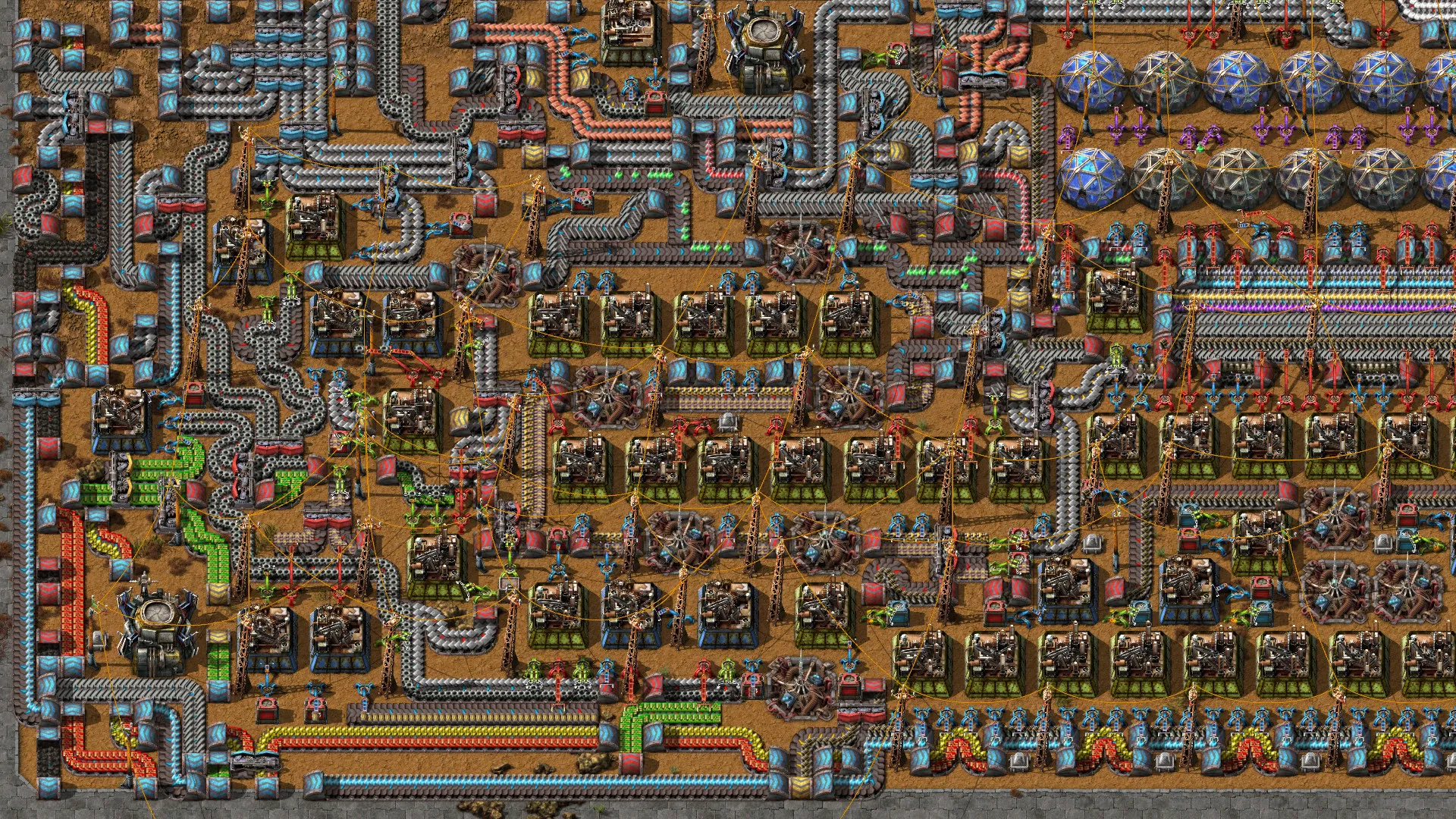
A large factory in Factorio, with a lot of moving parts
Most engines would struggle to handle this because of the huge amount of game objects involved and game makers would probably avoid making such a game. This is why Factorio was built on top of Allegro instead of an engine.
The same could be said about Minecraft, which has infinite worlds with countless blocks. While game objects are perfect for Minecraft entities, the block system, with world generation, saving the world, etc. is better handled with a framework than an engine.
I’m not saying that engines are bad, that you should never use them, or that it is impossible to make original games with them.
But you should be aware of the limitations engines impose on your game design, and that they are not as general-purpose as they advertise themselves to be.
In fact, many games made with frameworks could have worked in an engine, like “Baba Is You”, “Balatro” or “Animal Well”, but making them in an engine would have pushed the game design in a different direction, and they would have been different games.
How Vectarine tries to handle the issue
Section titled “How Vectarine tries to handle the issue”Vectarine is a framework-engine hybrid. It is like a framework because you could in theory make a game without ever using the editor, by writing code in your favorite text editor, and running it in the runtime (as if you exported the game each time to run it).
However, it is also an engine, because it provides you with an executable editor that scaffolds new projects, exports them, provides hot-reloading, asset management, debugging tools, etc. It is a complete package to make games.
As a framework-engine hybrid, I was very aware of this when designing Vectarine. I wanted to make it general-purpose like a framework while still providing the tools of an engine.
To do so, Vectarine provides you with different levels of API abstraction.
You can draw rectangles, sprites and text with a single function call, without ever relying on the concept of a game object just like in a framework:
image:draw(coord.CENTER, coord.px(100, 100))This code just draws an image at the center of the screen. There is no game object involved, you can draw anything anywhere at any time, without any constraints on the structure of your game.
But you can use modules like physics to manage objects with positions, velocity and collisions, like an engine.
-- Create a box objectconst boxCollider = physics.newRectangleCollider(vec.V2(10, 10))const box = world:createObject(vec.V2(0, 0), 1, boxCollider, {}, "dynamic")
-- Draw the box as a red rectanglelocal points = box:getPoints()graphics.drawPolygon(points, vec4.V4(1, 0, 0, 1))And, just like an engine, when using physics, you get access to debugging tools to visualize the colliders or edit velocities and positions in the watcher.
When writing the documentation, I tried to present the low-level APIs first and then the higher-level ones.
- You can first understand how the basic systems work
- Then, get ideas of what you want in your game
- Finally see what tools Vectarine provides to help you implement them.
This approach has limitations. For example, when editing a level, you implicitly tell Vectarine, when writing your level loading code, how objects in the level map to objects in your game, meaning that you don’t get as much of an out-of-the-box experience as other engines if you don’t use a ready-made template.
But this added flexibility is worth it, as it allows you to make games that would be hard to make in other engines. And if you don’t mind making a specific type of game, you can start from a template and get what you’d expect from other engines.